Buyer brief
Describe the buyer, company, timing signals, and obvious exclusions in plain English.
Describe who you want to reach or bring a list. Meetlane confirms fit and company first, adds evidence when useful, then guides contact and draft review.
Three ways in
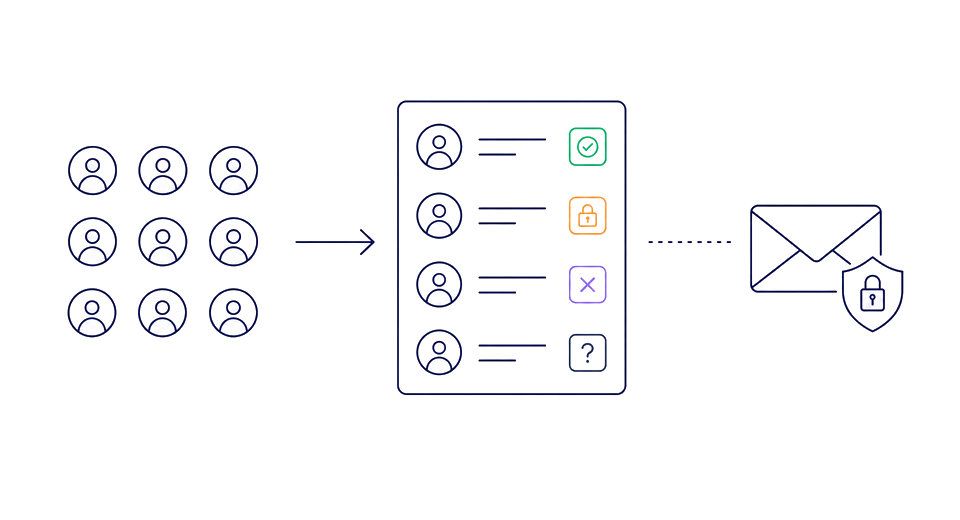
Every source enters the same review queue. Contact stays locked until you intentionally choose a readiness check.
Describe the buyer, company, timing signals, and obvious exclusions in plain English.
Upload CSV or TSV rows, or bring candidates from Apollo or Clay. Review every row before it enters Leads.
Find companies with a source-backed reason to talk now. Review the company first, then choose one person for Leads.
One calm path
Describe buyers, bring a list, or import from signals.
Confirm fit and company. Add evidence when it helps, then verify contact.
Check the claim and make the final decision.
You decide what to send.
Prepare the pack
Choose the leads and review the maximum cost. Meetlane confirms fit and company, adds qualifying evidence when found, checks contact readiness, and stops before Gmail.
Prepare leadsUncertainty is held, not guessed. You decide what reaches Gmail.
Example estimate
ScopeThis page · 10 leads
Meetlane calculates the maximum from the selected leads. You confirm the calculated cap before any paid checks run.
The confirmation control below is an illustrative example and is not interactive on this page.
This maximum covers this run. Later optional reruns require separate confirmation.
Watch companies. Follow new signals.
Keep selected companies on watch. When a qualified public signal appears after outreach, Meetlane prepares a source-backed follow-up for review.
Nothing sends automatically. You choose what reaches Gmail.
Meetlane checks each company weekly for qualified public signals.
You choose which contacted companies stay on watch.
Meetlane checks weekly for qualified public evidence.
A source-backed follow-up returns for your review.
You review the draft and decide what reaches Gmail.
Review-first pricing
Build campaigns, inspect blockers, and prepare Gmail drafts without credits.
Credits are used when you click a paid check or explicitly enable weekly monitoring. Nothing sends automatically.
One-time credits. Unused credits stay in your account.
No credits needed
100 non-expiring credits
For a focused review pass or first campaign.
Choose Starter300 non-expiring credits
For steady review work across active campaigns.
Choose Growth750 non-expiring credits
For larger campaigns and repeat review work.
Choose Campaign2,000 non-expiring credits
For teams reviewing larger lead batches across active campaigns. Available self-serve to every signed-in workspace.
Choose VolumeThese are alternative single-action maximums across repeated reviewed batches, not combined quotas. Lead Packs remain capped at 10 leads per run, and Meetlane shows the maximum credit cost before paid work starts.
Returns up to five candidates when usable candidates are found.
Checks contact readiness when a usable contact is found.
Five credits only when qualifying evidence is saved. No result is refunded.
Regenerates the rationale or draft when requested.
Human review before anything is sent.
Questions before you start? [email protected]